
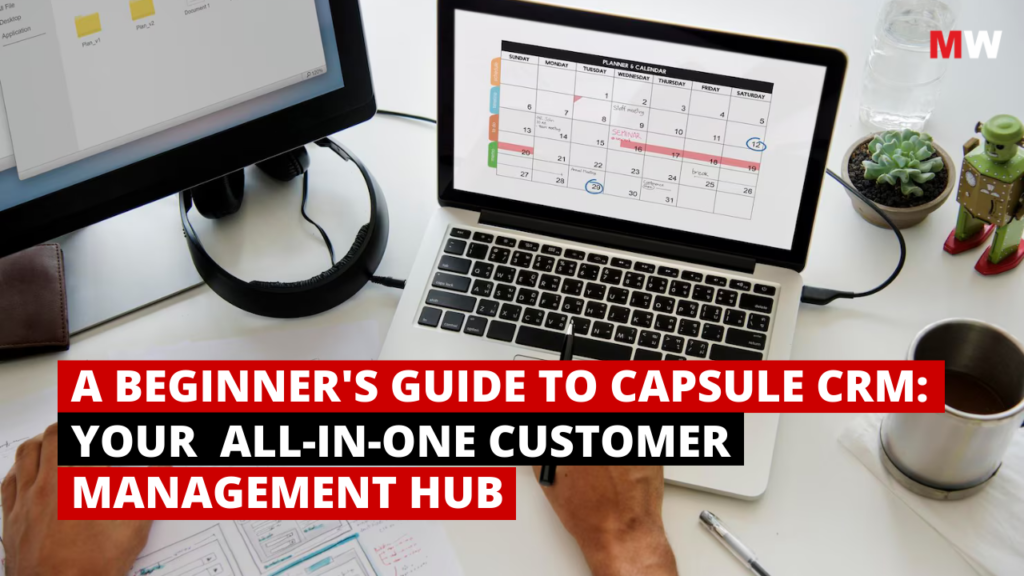

Introduction: Why CRM Matters

Imagine this: You’re running your day with emails, quick client calls, and scribbled sticky notes, which you promise that you’ll actually read later. A lead you chatted with last week rings back… and you can’t remember their request. A client nudges you about a proposal you never sent. Somewhere in that overloaded inbox is a message you missed three days ago—now costing you a chance you could’ve easily won.
It starts small. One missed follow-up, another forgotten detail, one lost opportunity. Then it piles up. Everything’s scattered—spreadsheets, threads, notes, random apps. You keep switching tabs. You try to keep up. But things slip. Not because you’re careless but because juggling all this manually is not built for the speed of business today.
This is where most beginners stall. Not for lack of skill but for lack of a CRM system for beginners. Something simple. Clear. Reliable. A way to keep customers, leads, and tasks in one place without burning out. Read more about CRM basics on Investopedia.
So let’s slow down and fix it. We’ll walk through a smarter, more structured approach that keeps your work tidy, relationships warm, and your day manageable.
A system like that already exists. And it has a name—CRM. See how Capsule CRM keeps everything in one place
CRM stands for Customer Relationship Management, but don’t let the fancy term overwhelm you. At its core, it’s simply one thing: a single, organised hub for every interaction and detail. All in one dashboard. No more digging through scattered tools or inbox chaos. Think of it as your external brain: A memory you don’t have to fight for, a place where information stays arranged even on your busiest days.Explore how management software simplifies business processes beyond CRM.
It helps you:
- Track leads without losing them.
- See conversations clearly.
- Follow up at the right time.
- Stay consistent (even when life or business gets chaotic).
- Give every client a smooth, professional experience.
Now that you know why it matters, let’s take the next step. Let’s break down how CRM actually works and how an important tool like Capsule makes the whole thing beginner-friendly, lightweight, and surprisingly easy to use.
What Is Capsule CRM?
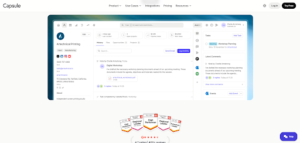
Capsule CRM is a cloud-based tool built for one simple thing: keeping your customer relationships clean and easy to manage. No clutter. No “50 features you’ll never touch.” Just the basics that actually matter: contacts, pipelines, tasks, and reports. Everything in one place instead of scattered across spreadsheets, inboxes, sticky notes…well, you know the chaos.
Learn more about Capsule CRM features. What makes Capsule feel different is how naturally it handles your customer story. Every email, note, file, and task sits in one neat timeline. You see where things started, what happened in between, and what needs to happen next. And the pipeline? It’s a smooth drag-and-drop board, something like Kanban-style. Visual. Fast. You can even create multiple pipelines if your work isn’t a one-size-fits-all situation.
And daily work doesn’t slip through the cracks either. Tasks, reminders, and repeating to-dos—they’re all there. Tracks help you automate the boring stuff. Reporting shows what’s working and what’s not. Plus, teams get proper controls, roles, and 2FA (Two-Factor Authentication). Just log in from anywhere and get moving. In short, Capsule CRM keeps things light but surprisingly powerful—easy enough for beginners, steady enough for teams that want order, not overwhelm.
Key Features of Capsule CRM
- Visual Sales Pipeline (CRM Pipeline Management)
Capsule gives you a simple, drag-and-drop pipeline. You just move deals from one stage to the next, almost like sliding sticky notes across your desk. And what if your business has different sales flows? You can build multiple pipelines without any fuss. - Task Management & Automation (Beginner-Friendly CRM Tools)
Create tasks, set reminders, and repeat them daily or weekly—whatever your workflow demands. And the best part: Tracks. These are ready-made sequences that auto-create tasks for common processes. Saves time and brainpower too. - Contact Management (All-in-One CRM Hub)
Everything about a customer stays in one place—emails, notes, files, past calls, even tiny details you usually forget. No more digging through old threads or scrolling endlessly. It’s all there waiting.Manage contacts easily with Capsule CRM. - Reporting & Analytics (CRM Insights)
Capsule doesn’t drown you in data. It gives you clean reports—sales numbers, activities, pipeline health—stuff you actually need to understand how things are going and what needs your attention next. - Smart Automation Tools (CRM Workflow Automation)
It automates small things that usually eat up your time. Like creating tasks when a deal moves stages. Or triggering workflows based on milestones. It feels tiny, but it adds up big. Check out our guide on top automation tools for small businesses - Email Integration (CRM with Gmail & Outlook)
Connect your Gmail or Outlook with Capsule CRM. Use templates. Send directly from Capsule. Keeps communication neat and connected to the right contact. - Security & Permissions (Safe CRM for Teams)
Two-factor authentication is there for safety. You can also assign roles and set who gets to see what. Now, that helps a lot when you’re working with a team and you don’t want everything open to everyone. Confidential. - Customization & Custom Fields (Flexible CRM Software)
Now the best thing about it is, you don’t have to force yourself into the rigid system; Capsule helps you add custom fields, organize contacts with tags, and tweak milestones. - Lead Capture & Integrations (CRM with Mailchimp, Xero, Zapier)
You are good to go with embedding forms on your site, using the mobile app, or connecting Capsule with tools like Mailchimp, Xero, or Zapier. See how SurveySparrow integrates with CRMs and Zapier for feedback automation.It plays nicely with other apps, so your data flows smoothly. For social media scheduling and analytics, explore Zoho Social alongside Capsule CRM. - Mobile Access (CRM App for iOS & Android)
Are you out of your office? No problem. Capsule’s mobile apps let you update info, check deals, or follow up on the go. - Export & Data Control (GDPR-Compliant CRM)
Yes! You own your data. Export it whenever you want, restore deleted items (within limits), and stay compliant with GDPR.
Now that you’ve seen what Capsule can actually do, the real question pops up—is it the right fit for you? Features are great, sure, but they only matter if they solve your everyday mess. So let’s break it down and see who benefits from using Capsule.
Who should use Capsule CRM?
Capsule CRM is ideal for anyone who needs a simple, clear way to manage customers without jumping into expensive, over-engineered CRM tools. Consultants who need pipelines, freelancers who forget follow-ups, agencies needing client history, and service providers tracking projects will find this a huge upgrade from spreadsheets and scattered notes. If your work involves tracking leads, remembering follow-ups, or managing deals, Capsule gives you a setup that just works.
It’s also budget-friendly. You don’t have to worry about burning money on heavy enterprise software. Capsule’s starter plan is affordable, beginner-friendly, and still gives you the core features you actually need. And if you grow, the higher plans are flexible, not overwhelming. Capsule fits nicely without stressing your wallet, whether you’re a solo freelancer or a small team getting organized. Explore HubSpot’s beginner guide to CRM.
Setting Up Capsule (Step-by-Step Guide)
Getting started with Capsule is, honestly, way smoother than most tools out there. No heavy downloads. No strange pop-ups. No “uhh… what do I click next?” moments. Just a few quick steps and boom—you’re inside, ready to organize your entire business life. Here’s a quick Capsule CRM tutorial to help beginners get started.
- Create Your Capsule CRM Account
Head over to Capsule’s site, hit sign up, and choose a plan, and yes, there’s a free trial. Easy, mate… and you’re in. The dashboard loads up, and you feel this tiny sigh of relief… like, okay, this looks manageable. - Add Your Contacts
This part feels good. Import everything—CSV files or Google Contacts—or add them one by one if that’s your style. Capsule pulls it all together into neat, clean profiles. No more scattered spreadsheets haunting you and your desktop. - Set Up Your Sales Pipeline
Time to map out how your deals actually move. Create stages like New Lead → Contacted → Proposal Sent → Won. Then you get that satisfying Kanban drag-and-drop thing going on. Simple, visual, no brain strain. - Customize Your Workspace
Give the workspace a little bit of “your” touch, something that feels natural to you. Add tags, custom fields, or whatever small bits of info matter to your workflow. A tiny tweak here and there, and suddenly everything feels less chaotic. - Connect Your Email
Link Gmail, Outlook, or whatever you use. Capsule starts logging conversations automatically, so you’re not digging through mail threads at 2 AM wondering, “Did I reply to this guy?” - Start Adding Tasks & Tracks
Now the real magic kicks in. Add tasks, set reminders, and build Tracks—these little automated workflows that quietly nudge you when it’s time to follow up. No more forgotten leads, no more “oops” moments. - Invite Your Team (Optional)
Working solo? Cool. Got a team? Even better. Add your people, set roles, and adjust permissions. Everyone stays in the loop with keeping certain things that you want confidential from the team.
And that’s it; you continue your work, it’s that simple. Now that we have understood the steps on how to get started with Capsule, let’s look into some common mistakes to avoid as beginners.
Common Beginner Mistakes to Avoid
Though Capsule is simple, beginners still slip into a few avoidable traps. Nothing dramatic, just small habits that later create big chaos. Keep an eye on these common mistakes so your CRM stays clean, fast, and actually useful.
- Adding contacts without organising them
- Ignoring the Sales Pipeline
- Not using tasks or follow-up reminders
- Treating Capsule like a notes dumping ground
- Avoiding integrations in the beginning
- Skipping email tracking setup
- Not customising the dashboard
- Skipping quick tutorials
Capsule CRM Pricing Plan Overview
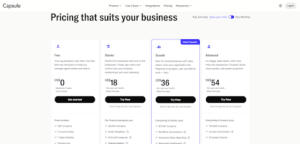
Capsule keeps its pricing super flexible, so whether you’re a freelancer, a growing agency, or a full team, you’ll find something that fits without stretching your budget too thin. Let’s look into what they offer:
- Free Plan
The Capsule CRM free plan is perfect for beginners: It supports up to 2 users and 250 contacts and is completely enough for you to test the waters and get familiar with the system.
- Starter Plan
Now that’s the first paid tier. You get 30,000 contacts, email templates, a shared mailbox, and Capsule’s AI-powered email assistant. That’s a solid pick for freelancers or small teams who want essential CRM features without going heavy.
- Growth Plan
The Capsule CRM Growth plan introduces automation and advanced reporting, ideal for small businesses scaling up. Perfectly ideal for teams that want structure and better visibility.
- Advanced Plan
The Capsule CRM Advanced plan supports up to 120,000 contacts, making it a strong fit for consultants and agencies. - Ultimate Plan
A custom, enterprise-level plan with dedicated support, training, and higher limits across the board.
Add-On: Marketing (Transpond)
Capsule also offers a standalone Marketing add-on known as Transpond. It will help you run email campaigns, build automation flows, create forms, and manage subscriber lists.
Pricing usually starts around $11/month, depending on your email volume.
Conclusion
Capsule CRM proves that a lightweight CRM software can still deliver powerful results.You won’t find confusing menus or fancy dashboards screaming for attention. Just the stuff that actually matters—clean contacts, organized deals, and a day that feels a little less chaotic.
If you are a freelancer juggling with clients, a small business trying to build a real sales flow, or maybe trying to grow a team that needs structure without turning life into spreadsheets, Capsule fits all of them. It just works. No long onboarding. No “oh gosh, I need a tech guy for this.” You sign in, breathe out, and it starts making sense.Discover future trends in management software shaping CRM evolution.
Because honestly, that’s what a CRM should do. Lift the mental load. Keep you consistent. Give you clarity on days when everything else feels messy. And somehow, Capsule manages to do all that… quietly, smoothly, almost effortlessly. Ready to simplify client management? Try Capsule CRM.
Frequently Asked Question (FAQ)
- Is Capsule CRM suitable for freelancers?
Yes, the Capsule CRM Starter plan is one of the best CRM options for freelancers. The Starter plan doesn’t hit your wallet and yet gives you the basics you actually need that don’t drown you in unnecessary stuff. It’s simple, clean, and honestly… almost perfect if you’re running things solo.
- Can I use Capsule without installing anything?
Capsule CRM is a cloud-based CRM software, accessible via browser or mobile app.
- How long does it take to get comfortable with Capsule CRM?
Not long at all. Most beginners pick it up in a day or so because the layout feels natural and well organised. You click around a bit, and things just start making sense. Take a good look at the dashboard, look into the small, quick tutorials, and you are good to go!
- Is Capsule good for teams that are growing?
Absolutely. If your team’s expanding and you want something that stays simple even as your workload gets messy, Capsule holds up pretty well. Deals, contacts, workflows—it keeps everything neat without making you feel lost.